Mon to Fri, 8:00am to 5:00pmUtalii Court, Gesora Road, Nairobi

+254 184 379 590+254 719 450 317 Altinfo@gstechguard.co.ke

Networks and IT

Server room setup checklist: space, power, cooling and security

A practical server room checklist for Kenyan offices, schools, hospitals and factories, covering room choice, racks, power and UPS, cooling, cabling, fire protection, access control, monitoring and documentation.

Racks in a tidy server room built from a server room checklist

Quick answer

A good server room starts with the right space: secure, dry and away from water and heat. Next, it needs racks, clean backup power, cooling that runs all year and tidy, labelled cabling. Finally, fire protection, access control, monitoring and records keep it safe for years.

A server room checklist helps you build or audit the space that holds your servers, network switches, firewalls, CCTV recorders and phone systems. When this room fails, the whole business often stops. Yet many Kenyan offices still keep critical equipment in a hot cupboard, under a staircase or beside a leaking pipe. This guide walks through each item to plan, whether you are setting up a new room or improving an old one. For design and installation, see our server room setup service, part of our network infrastructure services.

Why choose us

Why a server room checklist matters

Server rooms bring together power, cooling, cabling, security and fire safety. If one area is weak, the others cannot make up for it. For example, a perfect rack in a room without cooling will overheat, while a powerful UPS without ventilation will shorten its own battery life. As a result, a single server room checklist that covers every area is the simplest way to avoid gaps.

Meeting rooms

1. Choose the right room

The room itself is the first decision, and it is hard to change later.

In addition, think about access for equipment. Racks and UPS batteries are heavy, so the route from the entrance should not involve narrow stairs.

Server rooms

2. Racks and layout in your server room checklist

Close-up of server hardware lit in blue

Next, plan racks. Most small rooms use one or two 42U racks, while smaller offices may use a wall-mounted cabinet. Leave space in each rack for growth and for cable management.

Group equipment logically: patch panels and switches together, servers and storage together, and the UPS at the bottom because of its weight. Meanwhile, use blanking panels to fill empty spaces, which helps cool air reach the equipment. Finally, fix racks to the floor or wall where required.

Power backup

3. Power and UPS

Clean, reliable power is essential. In Kenya, outages, dips and surges are common, so plan carefully.

Power item What to check
Dedicated circuit Server room supplied from its own labelled circuit
UPS Online UPS sized for the load plus 25 to 30 percent headroom
Runtime Enough to cover outages or bridge to a generator
Bypass Maintenance bypass so batteries can be changed safely
Generator Automatic start and changeover where outages are long
Earthing Tested earth for racks and equipment
Surge protection On incoming power and external data lines

Our UPS sizing guide explains how to choose capacity and runtime. In addition, never plug heaters, kettles or printers into the server room UPS.

Server rooms

4. Cooling in the server room checklist

Heat is the main enemy of servers and batteries. Even in Nairobi's mild climate, a small closed room with equipment running all day becomes hot quickly.

  • Install dedicated air conditioning that runs all year, day and night.
  • For important rooms, consider two units, so one can fail or be serviced.
  • Aim for a steady temperature, typically around 18 to 27 °C at the rack inlet.
  • Keep doors closed, so cool air stays in the room.
  • Arrange racks so cold air enters the front and hot air leaves the back.
  • Add a temperature sensor with alerts.

In hotter places such as Mombasa, Kisumu or Machakos, cooling deserves even more attention, because outside temperatures put extra load on the air conditioner.

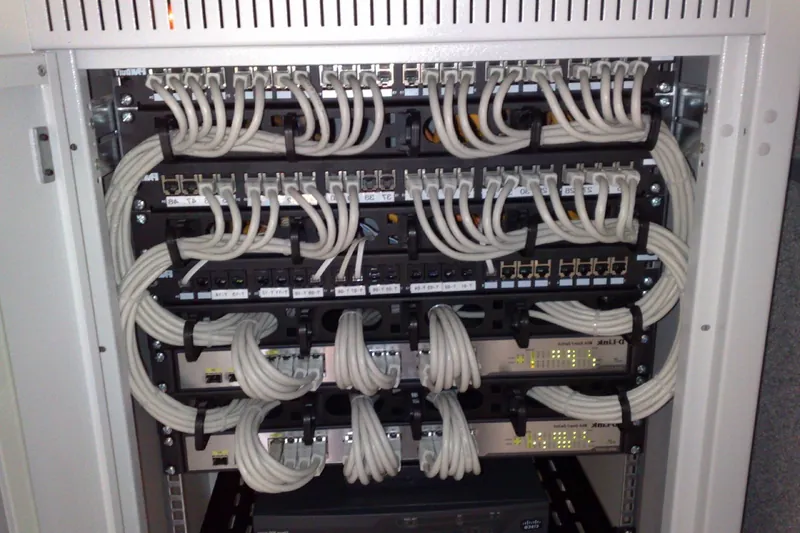
Network rack with patch panels and neatly dressed cables
Cooling, power and tidy racks are the core of any server room checklist.

5. Cabling and labelling

Good cabling makes the room easy to manage. Plan cable trays above racks or under a raised floor, separate power and data cables and use cable managers in each rack.

Every cable should carry a label at both ends, matching the patch panel and the floor plan. In addition, keep spare patch leads of the right lengths, so nobody runs long, loose cables across the room. Our structured cabling checklist covers office cabling in detail.

6. Fire detection and suppression

Server rooms need early warning of fire. Standard smoke detectors are the minimum, while aspirating detectors give earlier warning for important rooms. Link these to the building fire alarm.

For rooms that hold critical equipment, consider a clean-agent gas suppression system, which puts out fire without water damage. However, gas systems need a well-sealed room, warning signs and safe procedures for staff. Our fire suppression systems page explains the options. Finally, keep a suitable CO2 extinguisher by the door.

CCTV

7. Access control and CCTV

Only authorised people should enter the server room. So fit an access-controlled door with a card or biometric reader and keep a log of every entry. Add a camera covering the door and the front of the racks. In addition, lock racks where several teams share the room.

See our access control systems page for door options.

Server room checklist for Kenya

8. Monitoring and alerts

Problems in server rooms often start quietly. A failing air conditioner, a water leak or a UPS on battery can go unnoticed overnight. Therefore, monitoring is an essential part of any server room checklist.

Server room checklist for Kenya

9. Documentation and procedures

Records turn a room into a system that anyone can manage.

  1. Rack layout drawings showing every device.
  2. Cable records and test results.
  3. Network diagrams and IP address lists.
  4. UPS, cooling and fire system service records.
  5. A list of authorised people.
  6. Procedures for power failure, overheating and fire.
  7. Supplier contacts and warranty details.

Keep a printed copy in the room and a digital copy elsewhere.

Server rooms

Server room checklist for small offices

Not every office needs a full room. Small offices can use a lockable wall cabinet in a cool, ventilated space, with a small UPS, tidy patch panels and a temperature alert. Nevertheless, the same principles apply: clean power, cooling, security and labels. As the business grows, you can move to a dedicated room.

Server rooms

Common server room mistakes

We often find these problems during audits:

  • Equipment in a cupboard with no cooling
  • Air conditioning that switches off at night or at weekends
  • Water pipes running above racks
  • A UPS overloaded or with dead batteries
  • Cables everywhere, with no labels
  • No access control, so anyone can walk in
  • Cardboard boxes and spare equipment stored in the room

Fortunately, most of these are easy to fix once you spot them.

Server room checklist for moves and upgrades

Moving or upgrading a server room needs careful planning. First, build and test the new room before moving anything. Second, plan a move window, often a weekend. Third, back up all systems and label every cable before disconnecting. Finally, test services one by one after the move. Our IT relocation service handles these projects.

Who should own the server room checklist?

Every server room needs a named owner, usually the IT manager or a trusted IT support provider. That person keeps the server room checklist up to date, reviews alerts, books maintenance and controls access. In addition, a deputy should know the procedures, so the room is never left without someone responsible during leave or staff changes. Our IT annual maintenance contracts can cover these duties for smaller organisations.

Rules and standards

Standards and good practice

International bodies such as ASHRAE publish guidance on temperature and humidity for IT equipment, and cabling standards guide rack and cable design. In addition, Kenyan fire safety rules and data protection duties apply to the room and the data it holds.

To plan or audit your server room, request a site survey.

Get started

Book a site survey

Tell us about your site and an engineer will call you back within one working day to discuss your needs and arrange a visit.

  • Clear, itemised written quote
  • Security, network, fire and power from one team
  • Support and maintenance after handover

Prefer to talk? Call +254 184 379 590

We reply within one working day. Or call +254 184 379 590.

Frequently asked questions

How much space does a small server room need?

Allow enough floor area for your racks plus at least one metre of working space in front and behind, with room to grow by about 30 percent. Many small offices manage with one or two racks in a room of around 6 to 10 square metres.

What cooling does a server room need?

Dedicated air conditioning that runs day and night all year, sized for the equipment heat load. Important rooms benefit from two units, so one can fail or be serviced, plus temperature alerts.

Should a server room have fire suppression?

All server rooms need fire detection linked to the building alarm. Rooms with critical equipment may also justify a clean-agent gas suppression system, which puts out fire without water damage.

Do you relocate existing servers?

Yes. We plan the new room, label and back up systems, move equipment in an agreed window and test every service afterwards.

Planning a project or fixing a fault?

Tell us about the site. We will arrange a survey, give you a clear written quote and explain the options in plain language.

CallWhatsAppAsk usQuote