Mon to Fri, 8:00am to 5:00pmUtalii Court, Gesora Road, Nairobi

+254 184 379 590+254 719 450 317 Altinfo@gstechguard.co.ke

Routers · switches · VLANs · secure remote access

Office Network Setup in Nairobi

Our office network setup in Nairobi gives small and mid-size businesses a network that is fast, secure and easy to support. We configure routers, switches, firewalls, Wi-Fi and VLANs, set up safe remote access, and hand over plain-English documentation with every password in the right hands.

  • Configured for speed, security and growth
  • Staff, guest, camera and phone traffic kept apart
  • Clear documentation and password handover
Network engineer with a laptop configuring equipment during an office network setup in Nairobi

Many small offices run on whatever the internet provider left behind: one router, a cheap switch and a Wi-Fi password written on the wall. It works until the team grows, the cameras arrive and someone's laptop picks up malware. A proper office network setup gives you a solid base for the next five years, without enterprise complexity.

This page explains in plain English what a well-configured office network includes, how we separate different kinds of traffic, how remote access works and what you get at handover. We wrote it for owners and office managers, not network engineers.

Networking

What a properly configured office network includes

Think of your network as the roads inside your building. Good roads have lanes, signs and gates. Similarly, a good network has these parts:

Part Plain-English role
Router or firewall The gate between your office and the internet; it blocks unwanted traffic
Core switch The main junction that connects everything inside the office
Access switches Local junctions near desks, often supplying power to phones and cameras
Wi-Fi access points Wireless entry points for laptops and phones
VLANs Separate lanes so staff, guests, cameras and phones do not mix
DHCP and DNS Automatic addresses and names for every device
Backups of settings Copies of every configuration, so a failed device is replaced quickly

During an office network setup in Nairobi, we configure each of these to suit your size and the way your team works.

How it works

Routers, switches and firewalls in an office network setup

Business routers and firewalls do far more than consumer routers. They filter traffic, support two internet lines for failover, give priority to calls and video, and log what happens. For most small businesses, a single capable firewall-router is enough. Larger offices may separate the firewall and router functions.

Switches come in two kinds. Unmanaged switches simply connect devices. Managed switches let us create VLANs, monitor ports and supply PoE power to phones, cameras and access points. Because of these features, we use managed switches in almost every office network setup.

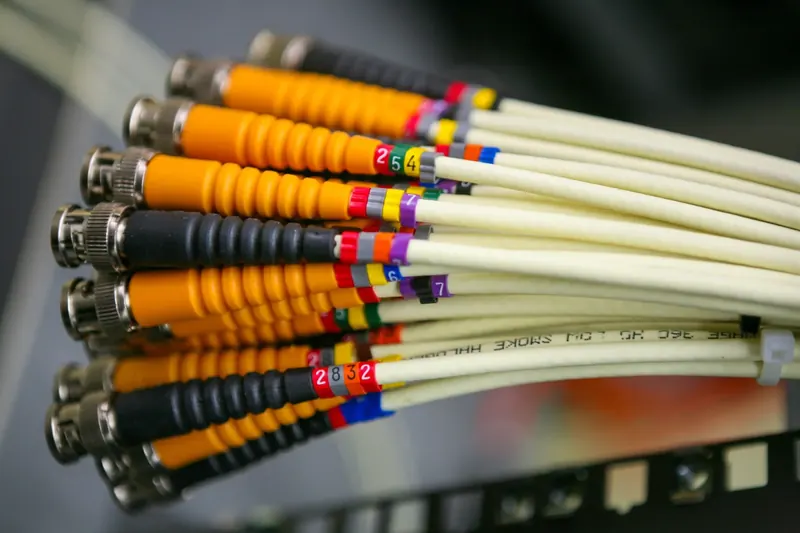
Server rack with switches and patch panels in an office network
Managed switches let us separate staff, guest, camera and phone traffic.

CCTV

VLANs: separating staff, guests, CCTV and phones

Separation improves security and speed. For example, a guest's infected phone cannot spread anything to staff computers, and a busy camera system does not slow down video calls.

Remote access in your office network setup

Staff increasingly work from home or travel between branches. They still need files, systems and sometimes the office phone system. A VPN (virtual private network) creates a secure, encrypted tunnel from the user's device to the office.

We set up VPN access with individual accounts, strong authentication and only the access each person needs. In addition, we can link branch offices with site-to-site VPNs, so a Mombasa branch reaches Nairobi systems as if it were on the same floor.

We avoid risky shortcuts such as opening ports straight to cameras or servers. Those shortcuts are a common cause of break-ins.

Internet lines and failover

Most offices rely on one fibre line. When it fails, work stops. A second line from a different provider, even a cheaper one, keeps the office online. The firewall switches traffic automatically when the main line drops, and it can share load when both lines work.

We work with your existing internet provider and can recommend backup options. Since we are not tied to one provider, our advice stays neutral.

Support and maintenance

Documentation and password handover

This is where many installers fall short. They finish the job and keep the passwords. Then, when they become unreachable, the business is locked out of its own network.

At the end of every office network setup, you receive:

  1. A network diagram showing every switch, access point and link.
  2. An IP address plan listing each VLAN and important devices.
  3. Device list with models, serial numbers and warranty dates.
  4. Configuration backups for the firewall, switches and Wi-Fi.
  5. Password handover in a sealed document or a password manager of your choice.
  6. A one-page summary in plain English, so a new IT person can get up to speed in an hour.

How it works

Office network setup in Nairobi: typical timeline

A small office of up to 25 users is often configured in one or two days, assuming cabling already exists. If new cabling is needed, our structured cabling team installs it first. Larger offices, multiple floors or branch links take longer.

We schedule the change-over outside working hours, so your team arrives to a working network on Monday morning.

Security

Security basics we always apply

For organisations that need more, such as policy reviews or advanced firewall rules, see our cybersecurity solutions page. Kenya's Data Protection Act guidance also expects reasonable security for personal data held on your systems.

Support after office network setup

Networks change as businesses change. New staff join, printers move and branches open. Our IT maintenance contracts include scheduled check-ups, firmware updates and remote help, so the network stays as tidy as on the day we finished.

How it works

Common problems a new setup solves

Owners usually call us after a specific problem. These are the ones we hear most often, and how a proper office network setup fixes them.

  • "The internet keeps dropping." Often the cause is a tired consumer router or a looped cable. A business firewall and managed switches stop both.
  • "Video calls freeze." Calls compete with large downloads. So we give voice and video priority on the firewall and switches.
  • "Guests use our printer." Guests share the staff network. A guest VLAN separates them in minutes.
  • "We cannot see the cameras from home." The recorder sits on an open port or none at all. A VPN gives safe remote viewing instead.
  • "Nobody knows the passwords." The previous installer kept them. We reset, document and hand them over.

In each case, the fix also makes the network easier to support, because every setting is recorded.

Who this service is for

Our office network setup in Nairobi suits law firms, clinics, NGOs, schools, agencies, small manufacturers and any business of roughly 5 to 150 users. We cover Westlands, Upper Hill, Kilimani, Lavington, Parklands, Mombasa Road and the CBD, and we support branches across Kenya.

To get started, request a quote and tell us how many users and devices you have.

What we need from you

To prepare an accurate quote, it helps to share a few details before the visit: the number of staff and how many work remotely, a rough list of devices such as printers, phones and cameras, your internet provider and line speed, and any software that must be reachable from outside. Also mention any problems you face today. With this information, we can usually confirm the design on the first visit and start work within days.

Get started

Book a site survey

Tell us about your site and an engineer will call you back within one working day to discuss your needs and arrange a visit.

  • Clear, itemised written quote
  • Security, network, fire and power from one team
  • Support and maintenance after handover

Prefer to talk? Call +254 184 379 590

We reply within one working day. Or call +254 184 379 590.

Frequently asked questions

How long does an office network setup take?

For an office of up to 25 users with existing cabling, configuration usually takes one or two days. New cabling, several floors or branch links add time. We plan the switch-over outside working hours, so staff return to a working network without losing a day.

Do you work with my existing ISP?

Yes. We configure your network around your current internet line and provider. If you want better uptime, we can add a second line from another provider with automatic failover. We are not tied to any provider, so our recommendations stay neutral.

Do I need managed switches for a small office?

In most cases, yes. Managed switches let us separate staff, guest, camera and phone traffic, power devices over PoE and see where problems happen. They cost a little more than basic switches but save time and improve security from day one.

Will I get all the passwords?

Yes. Every project ends with a full password handover, plus configuration backups and a network diagram. You own your network, so you should never depend on an installer to access it. We can store the details in a password manager you choose.

Areas we serve

Installed and supported across Kenya

Our Nairobi team travels to sites countrywide. Choose your town for local details.

Planning a project or fixing a fault?

Tell us about the site. We will arrange a survey, give you a clear written quote and explain the options in plain language.

CallWhatsAppAsk usQuote