Mon to Fri, 8:00am to 5:00pmUtalii Court, Gesora Road, Nairobi

+254 184 379 590+254 719 450 317 Altinfo@gstechguard.co.ke

Displays · cameras · microphones · video conferencing

Conference Room and Boardroom AV Installation

We design and install conference room AV systems in Nairobi and across Kenya so meetings start on time and everyone can see and hear clearly. We size the display, choose the camera and microphones for the room, tidy every cable and set up Teams, Zoom or Google Meet so joining a call takes one tap.

  • Rooms designed to work first time
  • Clear audio for people in the room and online
  • One-touch join for Teams, Zoom and Meet
Professional in a meeting room set up with conference room AV systems

Most people have sat through a meeting that started fifteen minutes late because the screen would not connect, the remote participants could not hear, or the camera showed only the top of someone's head. Every minute of that costs money and patience. Well-designed conference room AV systems remove that friction. People walk in, tap one button and the meeting starts.

This page explains room sizes and system types, how to choose microphones, speakers and cameras, how video conferencing fits in and why tidy installation matters.

Meeting rooms

Room sizes and system types

The right setup depends mostly on room size and how the room is used.

Room Typical size Suggested setup
Huddle room 2 to 6 people One display, all-in-one video bar with camera, mics and speaker
Meeting room 6 to 12 people Larger display or two screens, video bar or separate camera, table or ceiling mics
Boardroom 12 to 24 people Dual displays, PTZ camera, ceiling microphone array, ceiling speakers, control panel
Training room 20 to 60 people Projector or large LED, presenter microphones, room speakers, lecture capture
Hybrid hall 60+ people Professional audio mixing, multiple cameras, streaming support

We size each conference room AV system to the room and its use, not to a catalogue. A video bar can work brilliantly in a small room, yet struggle in a long boardroom.

Displays

Displays for conference room AV systems

A display must be large enough for the person furthest away to read shared content. As a simple rule, the screen height should be at least one sixth of the distance to the furthest viewer for detailed content. In practice, that means 65-inch to 86-inch displays for many meeting rooms, dual displays in boardrooms, and projectors or LED walls in training rooms. We also check glare from windows and lights, and mount screens at a comfortable height.

Audio

Microphones and speakers

Audio matters more than video. People forgive a soft picture, but they will not tolerate missing words. Therefore microphones get careful attention in every conference room AV design.

  • Video bars with built-in microphones suit small rooms where everyone sits within a few metres.
  • Table microphones pick up people around a long table without wires to each seat.
  • Ceiling microphone arrays keep tables clear and follow the person speaking.
  • Wireless presenter microphones suit training rooms where someone walks around.
  • Ceiling or wall speakers spread sound evenly so remote voices sound natural.
  • Echo cancellation stops remote participants hearing themselves.

Room acoustics matter too. Glass walls and hard floors cause echo, so we may recommend simple acoustic panels to improve clarity.

Conference room with display, video bar and meeting table
A video bar suits small rooms, while boardrooms need separate cameras and ceiling microphones.

How it works

Video conferencing setup in Nairobi offices

Most organisations use Microsoft Teams, Zoom or Google Meet. Many rooms now use a dedicated room system for one of these platforms, which offers a touch panel on the table and one-tap join from the calendar. Other rooms use a "bring your own device" approach, where staff connect their laptop with one USB-C cable to the room camera, microphones and display.

We help you choose. Dedicated room systems give the most consistent experience for frequent meetings. Bring-your-own-device rooms cost less and suit offices that use several platforms. In both cases, the network must be stable, so we check cabling and Wi-Fi and give room systems a wired connection. Our business Wi-Fi team covers wireless needs.

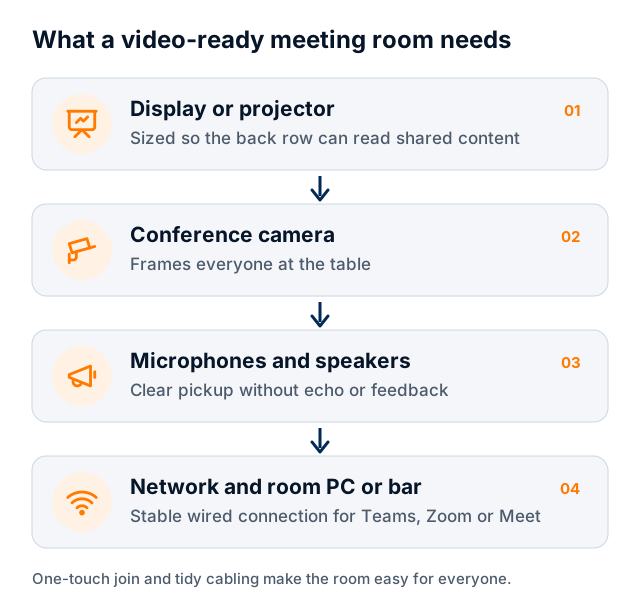
Flow showing display, camera, microphones and network in a video-ready room
Four parts make a video-ready meeting room.
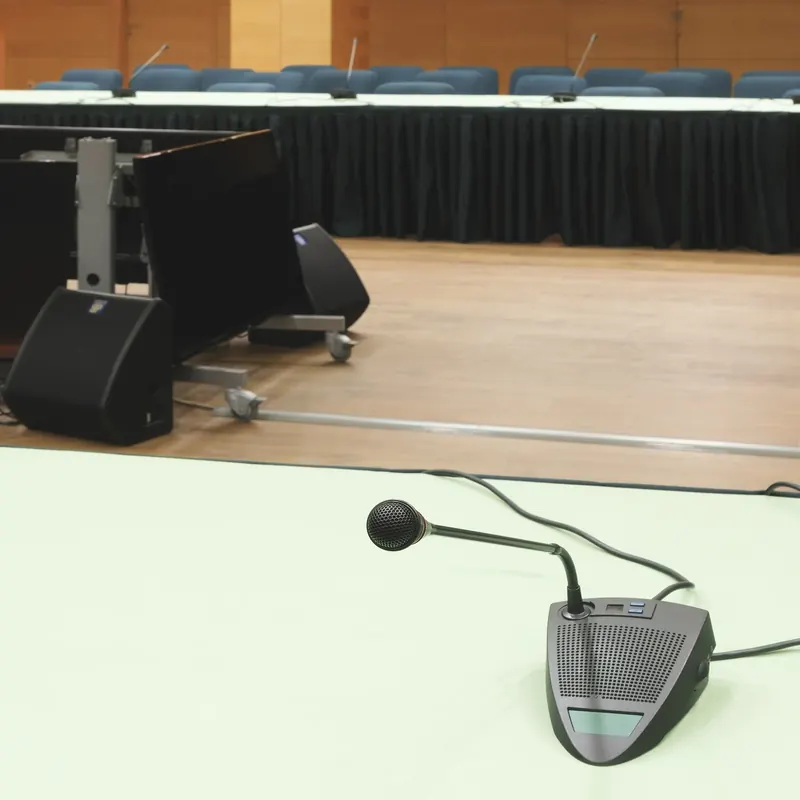
Conference microphone on a boardroom table with speakers

How it works

Installing conference room AV systems neatly

Loose cables under a boardroom table look bad and fail often. So we plan the installation carefully:

  1. Survey. We measure the room, note power and data points, and check wall strength for mounting.
  2. Design. Next, we choose equipment and plan cable routes through walls, floors or furniture.
  3. Cabling. Our team runs cables in conduit, floor boxes or furniture grommets, out of sight.
  4. Mounting. Then we fix displays, cameras and speakers securely, at the right height and angle.
  5. Configuration. We set up the room system, accounts, audio levels and the touch panel.
  6. Testing and training. Finally, we run test calls with remote participants and show staff how to use the room.

Accessibility and comfort

Good rooms work for everyone. Seats should face the screen without twisted necks, lighting should show faces clearly on camera, and controls should sit within easy reach. For staff with hearing difficulties, clear audio and captions in the meeting platform help a great deal, so we enable captions where the platform supports them.

Wireless presentation

Guests and staff often want to share a screen without plugging in. Wireless presentation systems let people share from a laptop, tablet or phone with a button or an app. We set these up on a secure network, separate from your main office systems, so visitors can share without reaching internal resources.

Control and simplicity

In larger rooms, a touch panel brings everything together: power on, choose the source, start the call, adjust volume, lower blinds and dim lights. We keep the interface simple with large buttons and plain labels. If the room links to smart office automation, a single "meeting" scene can set lights and air conditioning too.

Power and reliability

Displays, room computers and network switches should sit on clean power. In areas with frequent outages, a small UPS keeps a meeting running through short cuts and protects equipment from surges. See our UPS power backup page.

Meeting rooms

Conference room AV systems for different organisations

  • Corporate offices: consistent rooms across floors so staff always know what to expect.
  • NGOs and international organisations: frequent calls with partners in many time zones, often across several platforms.
  • Hotels and conference centres: flexible rooms that switch between meetings, training and events.
  • Universities and training centres: lecture capture and hybrid classes.
  • Churches: meeting rooms plus streaming from the main hall.

Meeting rooms

Common meeting room problems we fix

Many offices already have rooms that frustrate staff. The usual issues are easy to spot. Remote participants complain they cannot hear people at the far end of the table. The camera shows a wide view where faces are tiny. The display needs three remotes and a different adapter for every laptop. Echo makes every call tiring. Cables lie across the floor.

In most cases, we can fix these rooms without starting over. For example, adding a ceiling microphone and a proper speaker often solves audio complaints, while a single USB-C connection replaces a box of adapters. A simple touch panel or a clear instruction card can also make a big difference. So before replacing everything, ask us for a room review.

Support after installation

AV equipment needs updates and occasional help. We offer remote support, scheduled checks and quick fixes when something stops working. Firmware updates for room systems keep them compatible with Teams, Zoom and Meet. For wider support, see our IT annual maintenance contracts.

Cost factors for conference room AV systems

The cost depends on room size, the number of displays, camera type, microphone approach, whether you choose a dedicated room system, control panels, cabling and furniture work. A small huddle room with a display and video bar is a modest investment. A full boardroom with ceiling microphones and dual displays costs considerably more. We provide options at different levels after a survey.

Conference Room AV

Conference rooms often share equipment and cabling with other systems. Our PA systems page covers sound reinforcement for larger spaces, and our LED screens page covers large displays for receptions and halls. Platform makers such as Microsoft publish room requirements that we follow when certifying room systems.

To plan conference room AV systems for your office, request a site survey and tell us how many rooms and seats you have.

Get started

Book a site survey

Tell us about your site and an engineer will call you back within one working day to discuss your needs and arrange a visit.

  • Clear, itemised written quote
  • Security, network, fire and power from one team
  • Support and maintenance after handover

Prefer to talk? Call +254 184 379 590

We reply within one working day. Or call +254 184 379 590.

Frequently asked questions

What do I need for a Teams-ready boardroom?

A Teams-ready boardroom typically needs a certified Teams Rooms system with a touch panel, one or two large displays, a camera that frames the table, ceiling or table microphones, room speakers and a wired network connection. We size each part for the room and set it up so meetings start with one tap.

Should I choose a video bar or separate components?

Video bars combine camera, microphones and speaker in one unit and work well in rooms for up to about eight people. Larger rooms usually need a separate camera, ceiling or table microphones and room speakers, so people at the far end are heard clearly. We recommend after measuring the room.

Can guests share their screen wirelessly?

Yes. We can install a wireless presentation system that lets guests share from a laptop, tablet or phone. It runs on a separate, secure network, so visitors can present without access to your internal systems.

Can the room work with Teams, Zoom and Google Meet?

Dedicated room systems usually run one main platform and can join others as guests. A bring-your-own-device room works with whatever platform the user's laptop runs. If your staff use several platforms, we will explain the trade-offs and recommend the best fit.

Areas we serve

Installed and supported across Kenya

Our Nairobi team travels to sites countrywide. Choose your town for local details.

Planning a project or fixing a fault?

Tell us about the site. We will arrange a survey, give you a clear written quote and explain the options in plain language.

CallWhatsAppAsk usQuote