Mon to Fri, 8:00am to 5:00pmUtalii Court, Gesora Road, Nairobi

+254 184 379 590+254 719 450 317 Altinfo@gstechguard.co.ke

Power and weighing

UPS power backup for CCTV, access control and office networks in Kenya

How to plan UPS backup for CCTV, access control, routers and switches in Kenya, including which equipment to protect, runtime targets, battery choice, power quality, monitoring and maintenance.

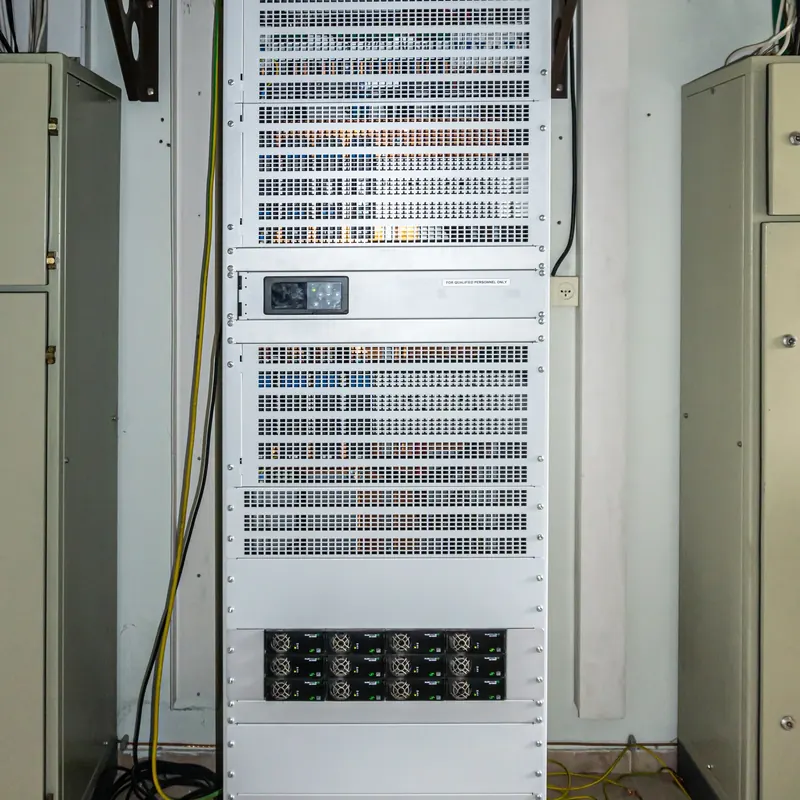
UPS units in a rack providing UPS backup for CCTV and network equipment

Quick answer

Power cuts are common in Kenya, so cameras, recorders, door controllers and network switches need backup. Start by listing the equipment and its power use, then choose a runtime target and size the UPS with headroom. Finally, test batteries regularly and replace them before they fail.

UPS backup for CCTV keeps cameras recording, doors working and networks online when the grid fails. In Kenya, outages and voltage dips are part of daily life for many sites, and a security system that stops during a blackout gives thieves exactly the window they want. This guide explains how to plan backup power for CCTV, access control and office networks. For installation, see our UPS power backup service, and for faults, our UPS repair and battery replacement service.

Why choose us

Why UPS backup for CCTV matters in Kenya

PTZ dome camera mounted under a roof

Without backup, a power cut stops cameras and the recorder at once. As a result, you lose footage of exactly the period when risk is highest. In addition, sudden power loss can corrupt recorder drives, and voltage spikes when power returns can damage equipment. Access control has its own risk: doors may unlock or stay locked, depending on the design. Meanwhile, a network without backup drops Wi-Fi, phones and remote viewing. For all these reasons, UPS backup for CCTV and related systems is not an extra but a core part of the design.

UPS backup for CCTV, access control and networks

1. Identify the equipment that must stay online

First, list every device that needs backup and its power use. A typical security and network system includes:

Equipment Typical power use
8-channel NVR with drives 20 to 40 W
IP camera (PoE) 4 to 12 W each, more with infrared at night
PoE switch 10 to 30 W plus camera load
Router or firewall 10 to 30 W
Access control panel and locks 20 to 60 W per controller
Wi-Fi access point 8 to 20 W each

Next, decide what is critical. For example, the recorder, cameras and door controllers are usually critical, while a TV monitor may not be. As a result, you avoid paying to back up equipment that can safely switch off.

Power backup

2. Decide the backup runtime target

Runtime is how long the system should keep working on battery. Choose it from your outage pattern and risk. For many urban sites, 30 to 60 minutes covers most outages. In contrast, rural sites, estates and warehouses may need several hours, which usually means larger battery banks or a link with a generator or solar system.

A practical approach is to ask: how long do outages usually last here, and does a generator start? If a generator starts within a minute, a short runtime may be enough. Otherwise, plan for longer.

CCTV

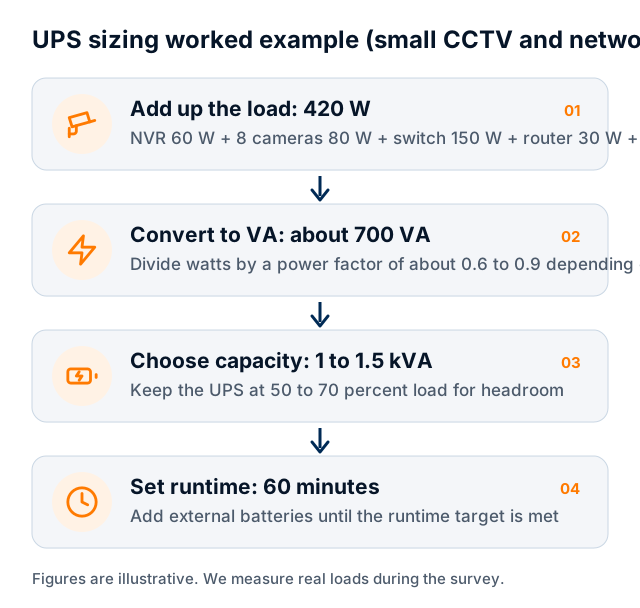
Worked example of UPS backup for CCTV

Consider a small office with an 8-camera system, a router and two access-controlled doors.

A 1 kVA line-interactive UPS can carry this load easily. However, its internal batteries may only give 20 to 40 minutes at that load. So for an hour or more, you would choose a model with external battery support. Our UPS sizing guide explains the method in detail.

Diagram showing a UPS sizing calculation

3. Consider power quality and equipment protection

Kenyan power problems are not only outages. Dips, surges and noise also damage electronics. Line-interactive UPS units correct small voltage changes and suit most CCTV and network cabinets. In contrast, online UPS units clean the power completely and suit servers, sensitive equipment and sites with poor supply, such as factories.

In addition, add surge protection on outdoor camera cables, especially in areas with frequent lightning. A single storm can destroy several cameras and a switch if the cables are unprotected.

Batteries for UPS backup for CCTV

Most UPS units use sealed lead-acid batteries, which typically last three to five years. Heat shortens their life sharply, so a UPS in a hot cupboard may need new batteries much sooner. Lithium batteries last longer and handle frequent cycling better, though they cost more at the start.

Whatever the type, batteries are the most common failure point. Therefore, plan for regular testing and replacement from the start, rather than waiting until the system fails during an outage.

Support and maintenance

4. Plan monitoring and maintenance

A UPS that nobody watches will eventually fail without warning. Good practice includes:

  • Network or app alerts for power failure and low battery
  • Monthly visual checks of indicators and alarms
  • A battery test every six months
  • Cleaning dust from vents and fans
  • Battery replacement before the end of rated life
  • A simple log of outages, tests and replacements

Our IT annual maintenance contracts can include UPS checks along with network and server care.

Power backup

5. Coordinate UPS with IT and security systems

IT engineer checking cables in a network cabinet

Backup power should be planned with the rest of the system. For instance, PoE switches let one UPS power both the network and the cameras. Similarly, access control panels often have their own batteries, which should be sized and tested too.

The fire alarm also needs thought. Access-controlled doors on escape routes must release in a fire, even when running on backup power. Therefore, check the fire alarm link during UPS tests.

Costs and pricing

Typical costs for UPS backup for CCTV

System Indicative range (KSh)
Line-interactive UPS for CCTV or network cabinet (1 to 2 kVA) 25,000 to 70,000
Online UPS for small server rack (1 to 3 kVA, about one hour) 60,000 to 250,000
Battery replacement per set 8,000 to 150,000+

These 2026 ranges are indicative. For more, see our security systems price guide.

Power backup

Common mistakes with backup power

  • Sizing the UPS for today's load with no headroom
  • Placing the UPS in a hot, unventilated cupboard
  • Forgetting the router, so cameras record but remote viewing fails
  • No surge protection on outdoor cables
  • Never testing batteries until an outage reveals they are dead
  • Plugging heaters or kettles into the UPS outlets

CCTV

UPS backup for CCTV at different sites

The right design depends on the type of site.

  • Homes and small shops. A small line-interactive UPS for the recorder, router and a few cameras usually gives enough runtime for short outages.
  • Offices. The network rack, CCTV recorder and door controllers often share one UPS, sized for 30 to 60 minutes.
  • Apartment blocks and estates. Gates, intercoms and cameras must keep working, so batteries for gate motors and a UPS for the guardhouse are both needed.
  • Schools and campuses. Several small UPS units in different buildings often work better than one large unit, because cables between buildings are long.
  • Warehouses and factories. Poor power quality from machinery makes online UPS units the safer choice.

In each case, the goal is the same: keep the critical equipment running long enough to cover typical outages, or until a generator takes over.

Electrician testing a distribution board with a meter

Placing and installing the UPS

Where the UPS sits affects how long it lasts. Ideally, place it in a cool, dry, ventilated space close to the equipment it protects. In contrast, avoid hot cupboards, ceilings and rooms that flood. In addition, an electrician should connect larger UPS units on a dedicated circuit with a maintenance bypass switch, so you can replace batteries without switching off the cameras. Finally, label the UPS outlets clearly, so nobody plugs a kettle or heater into them.

For long outages, a UPS works best with a generator or solar system. The UPS bridges the gap while the generator starts and cleans the generator's power. Meanwhile, solar systems with batteries can carry security loads for many hours at remote sites. If you plan solar, make sure the inverter output suits sensitive electronics. The Energy and Petroleum Regulatory Authority regulates solar installers in Kenya, so ask your solar supplier for their licence.

To plan UPS backup for CCTV and your network, request a site survey.

Get started

Book a site survey

Tell us about your site and an engineer will call you back within one working day to discuss your needs and arrange a visit.

  • Clear, itemised written quote
  • Security, network, fire and power from one team
  • Support and maintenance after handover

Prefer to talk? Call +254 184 379 590

We reply within one working day. Or call +254 184 379 590.

Frequently asked questions

What size UPS do I need for CCTV?

Add up the power of the recorder, cameras, switch and router, then add 25 to 30 percent headroom. A small 8-camera system usually needs about 200 to 250 W, which a 1 kVA UPS can carry. Runtime then depends on the battery capacity.

How long will a UPS run my cameras?

It depends on the load and battery size. A small UPS with internal batteries may give 20 to 40 minutes for a small system. For hours of runtime, choose a model with external batteries, or combine the UPS with a generator or solar.

How often should UPS batteries be replaced?

Sealed lead-acid batteries usually last three to five years, less in hot rooms or with frequent outages. Test them every six months and replace them before they reach the end of their rated life.

Do access control doors need backup power?

Yes. Controllers and lock power supplies need batteries or a UPS so doors keep working during outages. Doors on escape routes must still release when the fire alarm activates.

Planning a project or fixing a fault?

Tell us about the site. We will arrange a survey, give you a clear written quote and explain the options in plain language.

CallWhatsAppAsk usQuote